Contents
- Background
- Initial Ideas
- Enter Public-Key Cryptography
- GNU to the rescue
- The End
- In the Wild
- Comments
Background
Last week, my tech-savvy architect wanted access to a production OAuth client secret for debugging a customer data integrity issue. Sounds simple, but the problem starts with him not having access to LastPass. And you guessed it, we store all our secrets there. My memory of the event went like this:
Teams Chat - 2:34 AM
Architect: “Psst.. Alex. Hey Alex. I really need that OAuth secret for debugging. Can you just paste it in the chat?”
Me: “The production secret? The top secret customer access secret? I can’t just send it over Teams.”
Architect: “Come on, it’s just us in this channel. Who’s going to see it?”
Me: “The entire company? IT logs? Future me who forgets to delete the message?”
Architect: “Just delete it after I copy it. No one will know.”
Me: “Except the person who screenshots it. And the person who forwards it. And the person who…”
Ok fine. Maybe it wasn’t 2 AM, and the questioning is dramatised, but you get the point. Obviously he needs to send a request to get LastPass access on the corporate system, but that can take a day or two. In the meantime, should I send the plaintext password and have the SREs come for my first-born? Surely there is a more secure way.
Initial Ideas
So, assuming he really needed the secret now. I conjured up some other options:
- Encrypted zip files
The problem with this approach is that it becomes an onion-peeling of sending secrets, because now how do you share the password to the zip file securely? - Temporary shared drives
This one is probably worse, because it leaves the secret exposed in plaintext, and there is a log of drive access.
So by now, he’s ready to send off the obligatory Frodo gif.
But hold on, walking through the basic requirements - I need a way to send a secret in such a way that only the recipient can decrypt it. Well ok -
Enter Public-Key Cryptography
Sounds like I listed a direct use case of public-key cryptography. In other words I could use his public key, and only he would be able to decrypt it with his private top-secret key that only he can see.
More specifically, as per Wikipedia:
In an asymmetric key encryption scheme, anyone can encrypt messages using a public key, but only the holder of the paired private key can decrypt such a message. The security of the system depends on the secrecy of the private key, which must not become known to any other.
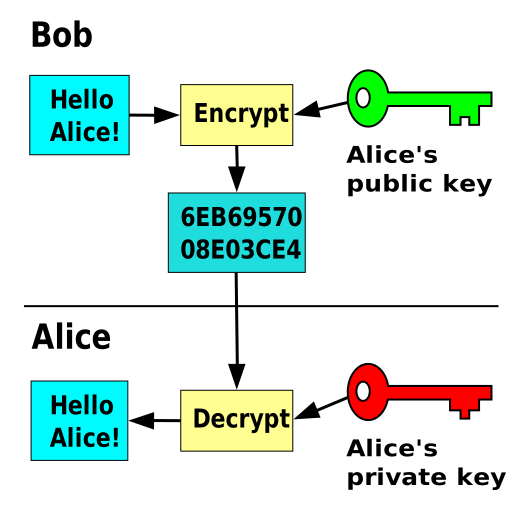
By Davidgothberg - Own work, Public Domain, Link
In this example of asymmetric key encryption, Bob uses Alice’s public key to encrypt a message, and only Alice can decrypt it with her private key. So long as no private key is leaked, the message is secure.
I’m fully onboard so I just need a nice and simple way to do this. OpenSSL popped into mind, but I had run into version mismatch issues the other day when trying to use it to decrypt a file. We’d need to exchange public keys in a PEM format, and the commands aren’t particularly user-friendly.
GNU to the rescue
GPG (GNU Privacy Guard) turned out to be a great fit for this scenario. I’m a big fan of the GNU project and philosophy, so this one was green flags for me. Also, GPG has a nice set of user-friendly commands as well as in-built key management for this sort of thing. Alright, the only thing left is to give it a go.
Steps
My architect already had a GPG key, go figure, but for the purposes of explaining steps this is what would have to happen:
Step 1: Export the recipient’s public key
# Recipient exports their public keygpg --export --armor john.doe@company.com > john_public.ascStep 2: Import and encrypt
# You import their public keygpg --import john_public.asc
# Encrypt the secretecho "oauth_top_secret_super_secret" | gpg --encrypt --armor --recipient john.doe@company.com > secret.asc
Step 3: Share and decrypt
# Recipient decrypts the shared secretgpg --decrypt secret.ascGPG Commands
There’s a few arguments to unpack, so here’s some of them:
Step 1 - Exporting the public key:
gpg --export- Exports a key from the local keyring--armor- Outputs the key in ASCII format (human-readable) instead of binaryjohn.doe@company.com- The email address identifying which key to export> john_public.asc- Redirects output to a file with.ascextension (ASCII format)
Step 2a - Importing the public key:
gpg --import- Imports a key into your local keyringjohn_public.asc- The ASCII-formatted public key file
Step 2b - Encrypting the secret:
gpg --encrypt- Specifies encryption mode--armor- Outputs encrypted data in ASCII format (easier to share via text)--recipient john.doe@company.com- Specifies who can decrypt (uses their public key)
Step 3 - Decrypting the secret:
gpg --decrypt- Specifies decryption mode (nice)
The End
So without too much hassle, we had securely shared the production secret. I felt pretty happy with the overall process, given that public-key cryptography has been around for a while and fitted the use case so well. It made me reflect on the way that a bunch of software is built to obfuscate the underlying technology, so it would be bad to become reliant on such tools as password managers to the point that you can’t share secrets otherwise.
Plus I could fire off this GIF back:
Although what portion of my chats are GIFs will have to remain a secret for another time.
In the Wild
While making an (upcoming) blog post about my MacBook setup for development, I was checking out Mitchell Hashimoto’s personal website. He is the creator of Ghostty, amonst other technologies (such as co-founding HashiCorp, as you do). On his misc page - https://mitchellh.com/misc - I saw the following link: “My GPG Public Key”.
So if you’ve followed this guide, you can also send secret messages to him as well. Pretty cool!